


The Ultimate Guide: Estimating the Time Required to Build a PC
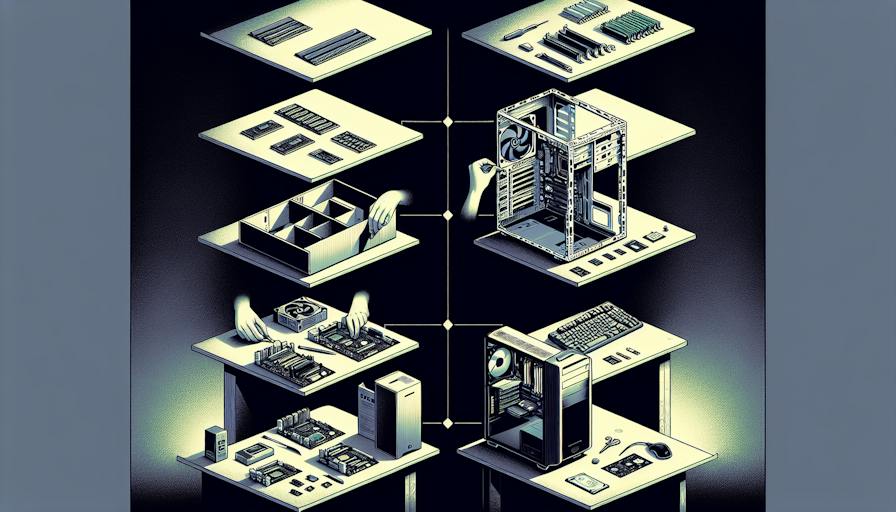
Building a Gaming PC
Establishing a gaming PC involves careful selection of components followed by systematic assembly. Both stages are pivotal in ensuring a successful build that meets gaming needs effectively.
Components Selection
Choosing the right components is essential for the performance and longevity of a gaming PC. Key components include the central processing unit (CPU), graphics processing unit (GPU), memory (RAM), storage, and the motherboard.
| Component | Key Considerations |
|---|---|
| CPU | Opt for high Max Turbo Frequency, numerous cores |
| GPU | Research benchmark scores; refer to game requirements |
| RAM | Aim for at least 16GB for smooth multitasking |
| Storage | SSDs for speed; combine with HDDs for larger capacity |
| Motherboard | Ensure compatibility with CPU and form factor |
Selecting a CPU involves looking for an Intel® Core™ processor that offers a high Max Turbo Frequency and multiple cores and threads, which will significantly enhance gaming performance. In terms of GPU, performing research on benchmark scores and checking the recommended system specifications for upcoming games are beneficial for making an informed choice.
Assembly Steps
Assembling a gaming PC consists of several detailed steps, including installing the CPU, memory, and storage devices, and mounting the motherboard within the case. Each step is crucial for a well-functioning PC.
- Gather required tools, including screwdrivers and anti-static wrist straps.
- Prepare the case by removing side panels to access the interior.
- Install the CPU onto the motherboard, aligning it properly to prevent damage.
- Attach the RAM sticks into the designated slots on the motherboard.
- Install the M.2 SSD or other storage devices as needed.
- Mount the motherboard inside the case, securing it with screws.
- Connect all power cables from the power supply to the motherboard and components.
- Insert the GPU into the appropriate slot and connect additional power cables.
- Finalize by connecting all fans and peripherals.
Each build may vary slightly depending on the chosen components and compatibility issues. This DIY approach not only enhances one's understanding of PC components but also allows for easy customization and future upgrades. For those considering long-term usage, questions may arise about energy consumption and costs associated with maintaining their system. For more information, explore our articles on should you leave a gaming PC on 24/7?, is it bad to shut down a PC every night?, how much electricity does a PC use in 24 hours?, and how much does it cost to run a PC for 24 hours?.
Time & Effort Considerations
Building a gaming PC requires careful planning and dedication. Understanding the time and effort involved can streamline the entire process for those keen on creating or maintaining their own systems.
Factors Affecting Build Time
The time it takes to construct a custom gaming PC varies depending on several factors. Here are the key elements that can influence the total build time:
| Factor | Description |
|---|---|
| Experience Level | Familiarity with PC components and assembly can speed up the process. |
| Component Selection | Choosing compatible parts may involve additional research time. |
| Complexity of the Build | Advanced features like custom cooling solutions can lengthen assembly time. |
| Preparation Time | Gathering tools and items in advance will reduce delays during the assembly process. |
| Testing and Troubleshooting | Ensuring everything works correctly can add hours to the overall build. |
It is essential for individuals to understand the components availability and compatibility to avoid unnecessary delays.
Preparation & Research
Preparation plays a critical role in ensuring a successful build. Before starting the assembly, thorough research on suitable components must be conducted. This includes:
- Identifying Requirements: Understanding the type of games and applications intended for the PC helps in selecting appropriate hardware.
- Gathering Tools: The necessary tools such as screwdrivers, anti-static wrist straps, and cable ties should be collected before beginning the build.
- Learning Resources: Utilising online guides and videos can provide valuable tips on assembling PCs and help clarify any questions regarding specific components.
Assembling a PC can be a continuous process involving not only the initial build but also regular upgrades and maintenance. The importance of preparation cannot be overstated, as it often determines how long it takes to build a PC. With proper guidance, assembly can become a straightforward task, making it an enjoyable experience for DIY enthusiasts and everyday users.
For those considering energy usage, it’s beneficial to understand how much electricity a PC uses in 24 hours and the associated costs of running it continuously as outlined in how much does it cost to run a PC for 24 hours?. Additionally, exploring if they should leave a gaming PC on 24/7 or if it is unwise to shut down a PC every night can aid in managing both operational habits and costs effectively.
Cost-Effective Strategies
Building or maintaining a gaming PC can be a significant investment. To save costs while ensuring optimal performance, it is essential to consider cost-effective strategies, particularly when deciding between upgrades and full builds.
Upgrading vs. Full Build
For many users, upgrading specific components such as the RAM, GPU, or storage can be a more economical option than investing in a complete new build. The incremental approach allows for tailored improvements without the hefty price tag associated with a full system construction.
| Upgrade Option | Estimated Cost (£) | Performance Impact |
|---|---|---|
| RAM Upgrade (16GB to 32GB) | 50 - 100 | Enhanced multitasking and gaming performance |
| GPU Upgrade (Mid-range) | 200 - 600 | Significant improvement in gaming graphics |
| Storage Upgrade (SSD) | 60 - 150 | Faster load times and system responsiveness |
Users primarily engaged in light computing tasks, such as web browsing or office applications, should consider which components to upgrade for better overall performance. This practice not only saves users money but also maximises the longevity of their current systems.
Econ-friendly Tips
In addition to strategically upgrading components, there are several tips for maintaining a gaming PC in an economically friendly manner. Users can reduce their operational costs while minimising energy consumption.
Monitor Power Usage: Understanding how much electricity does a PC use in 24 hours? is crucial for managing expenses. Identifying peak usage times can help users adjust their gaming schedule accordingly.
Efficient Usage: Users should consider whether should you leave a gaming PC on 24/7? might lead to increased running costs. Shutting down the PC when not in use can significantly cut down on electricity expenses.
Sleep Mode: Opting for sleep mode instead of shutting down or leaving a PC on can provide a middle ground. It allows for quick access while still conserving energy compared to full operation.
Cost Analysis: For those wondering how much does it cost to run a PC for 24 hours?, conducting a cost analysis could be helpful. By understanding the expenses, users can find ways to optimise their setup.
Regular Maintenance: Keeping the PC clean and well-maintained can prevent any overheating issues, thus prolonging the life of components and reducing the need for costly replacements.
By strategically upgrading components when necessary and following these economical tips, everyday users, eco-conscious individuals, and DIY enthusiasts can effectively manage their PC maintenance and build costs, ensuring both performance and affordability.


