


Level Up Your Gaming: Unlocking the Potential of Liquid Cooling Systems
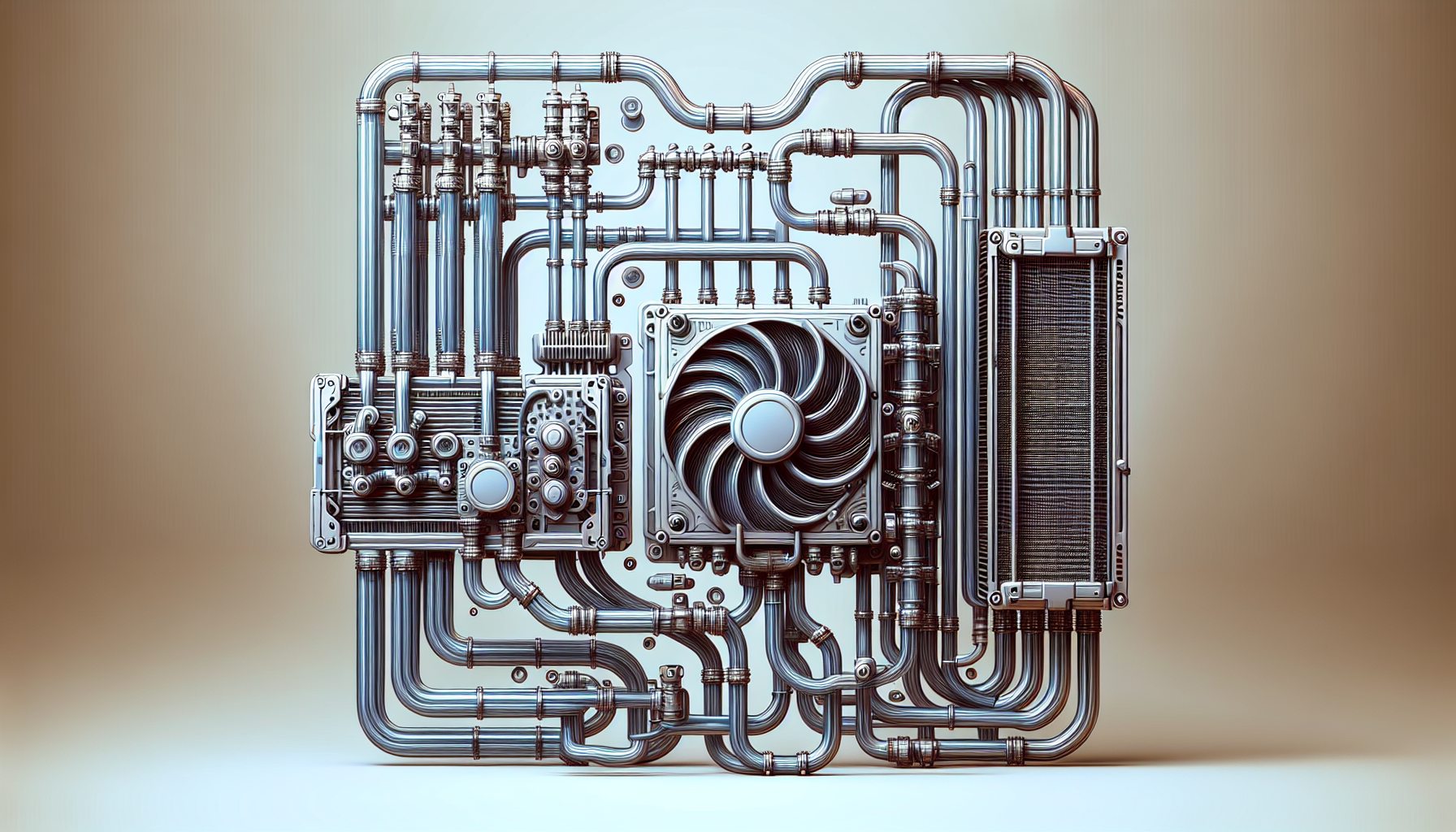
Understanding PC Cooling
To maintain the longevity and performance of your gaming PC, proper cooling is essential. Cooling systems help dissipate the heat generated by the CPU, GPU, and other components, preventing overheating and potential damage[^1^][^2^]. There are various types of cooling solutions available, including air cooling, liquid cooling, and hybrid cooling[^3^].
Importance of Cooling Systems
Cooling systems play a vital role in keeping your gaming PC running smoothly. They help regulate the temperature of your components, preventing them from reaching excessive levels that can lead to decreased performance or even permanent damage. By dissipating heat efficiently, cooling systems ensure that your CPU and GPU can operate at their optimal levels, allowing you to enjoy uninterrupted gaming sessions.
Types of Cooling Solutions
When it comes to cooling your gaming PC, there are multiple options to choose from. Two of the most common methods are air cooling and liquid cooling. Let's take a closer look at each:
Air Cooling
Air cooling is the traditional method of cooling and involves the use of fans to circulate air and dissipate heat. PC cases often come equipped with built-in fans, and additional fans can be installed to improve airflow. These fans draw in cool air from the surroundings and expel hot air generated by the components.
Air cooling is popular due to its simplicity, affordability, and reliability. It can effectively cool your PC, especially for moderate gaming setups. There is a wide range of PC fan types available, including RGB cooling fans for those who desire a visually appealing setup. Additionally, there are software options like fan speed control software that allow you to customize fan speeds and optimize cooling performance.
Liquid Cooling
Liquid cooling, also known as water cooling, is a more advanced cooling solution that utilizes liquid coolant to dissipate heat. Liquid cooling systems consist of radiators and fans that help dissipate heat from the liquid coolant. The liquid absorbs heat from the components and carries it to the radiator, where the heat is released into the surrounding air.
Liquid cooling offers several advantages over air cooling. It provides superior heat dissipation, resulting in lower temperatures and improved performance[^4^]. By utilizing liquid cooling, you can achieve more efficient heat transfer and maintain lower operating temperatures for your PC components[^5^]. This can be especially beneficial for high-end gaming systems that generate a significant amount of heat.
When it comes to liquid cooling systems, there are different components to consider:
- Radiators and Fans: Radiators help dissipate heat from the liquid coolant, and fans assist in airflow to facilitate heat exchange[^6^].
- Pump and Reservoir: The pump and reservoir in a liquid cooling system circulate the coolant and maintain proper flow for effective heat transfer[^7^].
- Tubing and Coolant: Tubing and coolant play a crucial role in liquid cooling systems, ensuring proper circulation and heat dissipation[^8^].
It's important to note that installing a liquid cooling system requires careful consideration of component compatibility and proper installation techniques[^9^]. Regular maintenance, such as cleaning radiators and checking coolant levels, is also necessary to ensure optimal performance[^10^].
In the battle of liquid cooling vs. air cooling, it ultimately comes down to your specific needs and budget. Both methods have their advantages and drawbacks, so it's essential to choose the cooling solution that best fits your gaming setup.
By understanding the importance of cooling systems and exploring the different types of cooling solutions available, you can make an informed decision to level up your gaming experience while keeping your PC components cool and protected.
Benefits of Liquid Cooling
When it comes to keeping your gaming PC cool and performing at its best, liquid cooling systems offer a range of advantages over traditional air cooling methods. Let's explore the benefits of liquid cooling, including its efficiency and performance enhancements.
Efficiency of Liquid Cooling
Liquid cooling systems are known for their exceptional cooling efficiency. Compared to air cooling, which relies on fans to dissipate heat, liquid cooling utilizes a liquid coolant that absorbs and carries away heat more effectively. This results in lower temperatures for your PC components, enhancing their longevity and preventing overheating during intense gaming sessions.
The efficiency of liquid cooling is particularly beneficial for high-performance gaming PCs that generate significant heat. By effectively removing heat from critical components such as the CPU and GPU, liquid cooling allows them to operate at optimal temperatures, maximizing their performance potential.
Performance Enhancements
One of the primary advantages of liquid cooling is its ability to deliver superior cooling performance, which translates into better overall system performance. By maintaining lower temperatures, liquid cooling systems help prevent thermal throttling, a phenomenon where the CPU or GPU reduces its clock speed to avoid overheating. This ensures that your PC can consistently deliver the highest possible performance, even during demanding gaming scenarios.
Additionally, liquid cooling systems offer quieter operation compared to air cooling. The absence of loud fans constantly spinning at high speeds can significantly reduce noise levels, creating a more immersive and enjoyable gaming experience.
Liquid cooling systems also provide flexibility in terms of customization and aesthetics. With various options available, such as RGB cooling fans and customizable coolant colors, you can personalize your gaming PC's appearance to match your style and preferences.
By investing in a liquid cooling system for your gaming PC, you can unlock its full potential by keeping temperatures low, ensuring optimal performance, and enhancing the overall gaming experience.
In the next section, we will explore the different components that make up a liquid cooling system, including radiators, fans, pumps, reservoirs, tubing, and coolant. Stay tuned to learn more about the inner workings of these advanced cooling solutions.
Components of a Liquid Cooling System
To fully understand the potential of liquid cooling systems for gaming PCs, it's essential to familiarize ourselves with the key components that make up these efficient cooling solutions. A liquid cooling system consists of several essential parts, including radiators and fans, a pump and reservoir, and tubing and coolant.
Radiators and Fans
Radiators and fans are integral components of a liquid cooling system that help dissipate heat generated by the PC's components. The radiator acts as a heat exchanger, transferring heat from the liquid coolant to the surrounding air. It is typically made of metal, such as aluminum or copper, due to their excellent heat conductivity.
To maximize heat dissipation, fans are attached to the radiator. These fans draw cool air through the radiator, removing heat from the liquid coolant and expelling it out of the system. High-quality fans with adjustable speeds allow for precise control over cooling performance, ensuring optimal temperature management for your gaming PC.
Pump and Reservoir
The pump and reservoir work in tandem to circulate the liquid coolant throughout the cooling system. The pump is responsible for pushing the coolant through the tubing and components, maintaining a steady flow. It is crucial to choose a pump that offers sufficient flow rate and pressure to ensure efficient heat transfer.
The reservoir serves as a storage tank for the coolant, providing a stable supply for the pump. It also acts as a bleed valve, allowing air bubbles to escape from the system. The size and design of the reservoir can vary, but it is commonly made of transparent materials to easily monitor the coolant level and ensure proper maintenance.
Tubing and Coolant
Tubing carries the liquid coolant from the reservoir to the various components of the cooling system. It is essential to use tubing specifically designed for liquid cooling systems, such as flexible and durable materials like PVC or silicone. Proper tubing management is crucial to ensure efficient coolant flow and prevent kinks or blockages that can hinder performance.
The coolant, often a mixture of distilled water and additives, is responsible for absorbing heat from the PC's components. It circulates through the tubing, absorbing heat as it passes over hot surfaces and carrying it to the radiator for dissipation. Coolants can also contain additives to prevent corrosion, microbial growth, and promote better heat transfer.
Understanding the components of a liquid cooling system is vital when considering the potential benefits and advantages it can offer for your gaming PC. However, it's also important to compare liquid cooling systems to air cooling options to determine the best cooling method for your specific needs. By choosing the right components and configuring your liquid cooling system correctly, you can achieve optimal cooling performance and unlock the full potential of your gaming PC.
Installation and Maintenance
To fully unlock the potential of liquid cooling systems for your PC, it's essential to understand the proper installation and maintenance procedures. This section will guide you through the steps of installing a liquid cooling system and provide tips for maintaining its optimal performance.
Installing a Liquid Cooling System
Installing a liquid cooling system requires careful attention to detail and precision. Here are the general steps to follow:
Prepare Your PC: Before installation, ensure your PC is powered off and disconnected from the power source. Take the necessary precautions to prevent static electricity discharge by grounding yourself.
Select the Right Components: Choose a liquid cooling system that is compatible with your PC's specifications, including the CPU socket type and case size. Check the manufacturer's instructions for specific compatibility details.
Mount the Radiator: Find an appropriate location within your PC case to mount the radiator. Typically, it is installed at the front, top, or rear of the case. Ensure proper clearance for airflow and secure the radiator using the provided screws or brackets.
Install the Water Block: Attach the water block to the CPU following the manufacturer's instructions. Apply a thin layer of thermal paste between the CPU and water block to facilitate heat transfer.
Connect the Tubing: Connect the tubing from the water block to the pump and reservoir. Use appropriate fittings and ensure secure connections to prevent leaks.
Connect the Fans: Install the fans on the radiator to facilitate airflow. Connect them to the appropriate fan headers on your motherboard or fan controller.
Fill the Loop: Fill the reservoir with the recommended coolant, following the manufacturer's instructions. Start the pump to circulate the coolant throughout the system. Bleed any air bubbles by tilting the case gently.
Test for Leaks: Once the loop is filled, inspect all connections for leaks. Run the system for a short period while monitoring for any signs of leakage.
Maintaining Your System
Proper maintenance is crucial to ensure the longevity and optimal performance of your liquid cooling system. Here are some maintenance tips to keep in mind:
Regular Cleaning: Dust and debris can accumulate on the radiator and fans over time, hindering airflow and cooling efficiency. Regularly clean these components using compressed air or a soft brush to remove any build-up.
Monitor Coolant Levels: Check the coolant levels in the reservoir periodically. If the levels are low, top up with the recommended coolant to maintain proper circulation.
Inspect for Leaks: Routinely inspect all connections and fittings for any signs of leaks. If you notice any leaks or suspect a problem, address it promptly to prevent damage to your PC components.
Monitor Temperatures: Utilize PC temperature monitoring software to keep track of your system's temperature. Elevated temperatures could indicate a problem with your cooling system.
Consider Fan Speed Control: Use fan speed control software to adjust the fan speed based on your cooling needs. This helps maintain a balance between cooling performance and noise levels.
By following these installation and maintenance guidelines, you can ensure that your liquid cooling system operates efficiently and effectively. Remember to refer to the manufacturer's instructions for specific details regarding your particular liquid cooling system. If you're considering alternative cooling options, you can explore the differences between air and liquid cooling to make an informed decision for your gaming PC.
Liquid Cooling vs. Air Cooling
When it comes to cooling your gaming PC, two popular methods are liquid cooling and air cooling. Each method has its own set of pros and cons, and it's important to understand them in order to make an informed decision.
Pros and Cons
Liquid Cooling
Liquid cooling offers several advantages for gaming PCs. Here are some of the pros:
- Efficient Heat Dissipation: Liquid cooling systems are known for their superior heat dissipation capabilities. The use of coolant and radiators allows for efficient transfer of heat away from critical components, such as the CPU and GPU.
- Noise Reduction: Compared to air cooling, liquid cooling systems tend to operate more quietly. The absence of loud fans can provide a more enjoyable gaming experience, especially for those who prefer a quieter environment.
- Overclocking Potential: Liquid cooling can better handle the increased heat generated by overclocking, allowing for higher performance levels without the risk of overheating.
- Aesthetics: Many liquid cooling systems feature visually appealing components, such as transparent tubing and vibrant coolant, which can enhance the overall look of your gaming rig.
However, there are also some cons to consider when it comes to liquid cooling:
- Complex Installation: Installing a liquid cooling system can be more complex and time-consuming compared to air cooling. It requires careful planning, proper routing of tubing, and securing various components in your PC case.
- Higher Cost: Liquid cooling systems tend to be more expensive upfront compared to air cooling solutions. This includes the cost of the components, such as the pump, radiator, and water blocks, as well as the potential maintenance expenses.
- Maintenance Requirements: Liquid cooling systems require regular maintenance, including checking coolant levels, cleaning radiators, and ensuring there are no leaks. Failure to maintain the system properly can result in reduced performance or even damage to your PC components.
Air Cooling
Air cooling, on the other hand, is a more traditional and straightforward method of cooling. Here are some of the pros of air cooling:
- Affordability: Air cooling solutions are generally more affordable compared to liquid cooling systems. They typically consist of CPU coolers and case fans, which are readily available at various price points.
- Easy Installation: Installing air coolers and fans is relatively simple and requires less technical expertise compared to liquid cooling. Most CPU coolers come with detailed instructions, making the installation process straightforward.
- Low Maintenance: Air cooling systems generally require less maintenance compared to liquid cooling. Regular cleaning of dust and debris from the fans and heat sinks is typically sufficient to keep the system running optimally.
However, there are some limitations to air cooling:
- Heat Dissipation: Air cooling may not be as effective at dissipating heat compared to liquid cooling. This can result in higher temperatures under heavy load, potentially impacting the performance and longevity of your PC components.
- Noise Levels: Air cooling systems can be louder compared to liquid cooling, especially when running at higher fan speeds. This can be a consideration for those seeking a quieter gaming environment.
Choosing the Right Cooling Method
Choosing between liquid cooling and air cooling ultimately depends on your specific needs and preferences. Consider the following factors when making your decision:
- Budget: If you have a limited budget, air cooling may be a more cost-effective option. However, if you're willing to invest in superior cooling performance and aesthetics, liquid cooling may be worth the additional expense.
- Overclocking: If you plan to overclock your CPU or GPU for maximum performance, liquid cooling is generally more suitable due to its superior heat dissipation capabilities.
- Noise Sensitivity: If noise levels are a concern, liquid cooling may be more appealing due to its quieter operation. However, there are also air cooling solutions available that offer quiet operation, such as those equipped with larger, slower-spinning fans.
- Maintenance: Consider your willingness to perform regular maintenance tasks. Liquid cooling systems require more maintenance compared to air cooling, so ensure you're willing to allocate time for proper upkeep.
By considering these factors and evaluating your specific requirements, you can make an informed decision on whether to opt for liquid cooling or air cooling for your gaming PC. Remember to also check top-rated cooling fans and explore other cooling solutions to find the best fit for your gaming needs.
Top Liquid Cooling Brands
When it comes to liquid cooling systems, there are several popular brands that have established themselves as leaders in the market. These brands are known for their high-quality products and innovative technologies. Let's explore some of the top liquid cooling brands that gamers trust for their cooling needs.
Popular Brands
Corsair: Corsair is a well-known brand in the gaming industry, offering a wide range of PC components and peripherals. They have gained a strong reputation for their liquid cooling solutions, known for their exceptional performance and reliability. Corsair offers various liquid cooling options, including all-in-one (AIO) coolers and custom loop components.
NZXT: NZXT is another popular brand that caters to the gaming community. They offer sleek and stylish liquid cooling solutions that not only provide excellent cooling performance but also enhance the aesthetics of your gaming rig. NZXT's AIO coolers are highly regarded for their efficient cooling capabilities and easy installation.
Cooler Master: Cooler Master is a trusted brand that has been in the PC cooling industry for years. They offer a diverse range of liquid cooling products, including AIO coolers and custom loop components. Cooler Master is known for their durable and high-performing liquid cooling solutions that can handle the demands of intense gaming sessions.
Thermaltake: Thermaltake is a well-established brand that offers a wide range of PC cooling solutions, including liquid cooling systems. They provide both AIO coolers and custom loop components to suit different user preferences. Thermaltake's liquid cooling products are known for their reliability, efficiency, and advanced features.
Customer Reviews and Recommendations
When considering liquid cooling systems, it's always helpful to take into account the experiences of other gamers. Customer reviews and recommendations can provide valuable insights into the performance, reliability, and overall satisfaction with a particular brand or product.
To find customer reviews and recommendations, you can visit online forums, PC gaming communities, and e-commerce websites specializing in gaming gear. These platforms often have sections dedicated to product reviews and discussions, allowing you to gather opinions from fellow gamers who have used different liquid cooling brands.
Remember that individual experiences may vary, and it's important to consider multiple sources before making a decision. Additionally, factors such as compatibility with your specific PC setup and budget should also be taken into account.
By exploring the popular brands and considering customer reviews and recommendations, you can make an informed decision when choosing a liquid cooling system for your gaming PC. It's always a good idea to research and compare different options to find the one that best suits your cooling needs and preferences.


